

A coffee printer is a food-grade inkjet that prints edible-ink logos, photos, and text onto latte foam, cookies, and cakes. Here is how it works, what it prints on, what it costs to run, and whether printed drinks pay off for a cafe.
A guest orders a flat white and gets it back with their own name across the foam, or your logo in full color. That is what a coffee printer does — and the same machine prints the same image onto a cookie, a macaron, or a brownie. It is one of the few pieces of cafe equipment people photograph before they drink, which is exactly why owners ask about it. This guide covers what the device actually is, what it prints on, what it costs, and where the money comes back.
What is a coffee printer and how does it work?
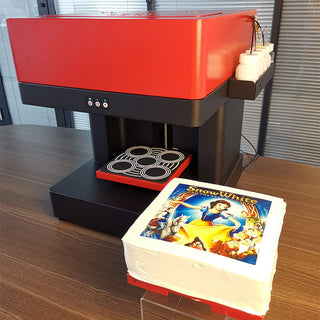
A coffee printer (sold for both drinks and desserts as a coffee and cookie printer) is a semi-automatic, food-grade inkjet. Instead of paper, the "page" is the surface of your product — milk foam, royal icing, fondant. Instead of office toner, it uses CMYK edible ink fed through a Continuous Ink Supply System, so you refill from bottles rather than swapping cartridges.
The workflow is short. You load artwork — from a PC over USB, from a phone via a QR code, or straight from the machine's own touchscreen, depending on the model — place the item on the tray, and the machine lays down the image in one pass. A piezoelectric print head handles the detail: 720×720 DPI for everyday names and logos, up to 5760×1440 DPI when you want a photograph to read cleanly. A single cup takes 15–30 seconds, and a tray holds a batch — up to 4 coffees or 9 macarons in one run on the larger-bed model, which is what keeps it viable during a rush.
What can a coffee printer print on?
The ink is food-grade and tasteless, so the limit is the surface, not the design. In practice it prints on:
- Coffee and cocktail foam
- Cookies, cakes, and brownies
- Macarons, chocolates, and ice cream
- Toast and other light, flat-topped items
Print area depends on the model — from a cup-and-pastry-sized 5–11 cm up to a 20×20 cm bed that clears a tall cup or a small cake, not just a saucer. Anything light-colored and reasonably flat holds the image; very dark or glossy surfaces read worse, the same as any ink on any substrate.
Where a coffee printer earns its place
For a new cafe or dessert shop, the printer is a differentiator that needs no extra staff skill — a name on a birthday latte or a logo on a cookie, printed by whoever is on shift. For hotels and event caterers it is an upsell: branded welcome drinks, themed desserts for a wedding, logo macarons for a corporate launch. The shared draw is reach: a printed cup gets posted, and that exposure costs you nothing per share.
It earns least in a high-volume venue that competes on speed alone, where a 15–30 second print per item is friction rather than feature. Match it to a format where the photo moment is part of the product.
Coffee printer vs hand latte art and sugar sheets
The printer replaces or extends two things you may already do — freehand decoration and pre-made toppers. Here is how they compare on the axes that matter behind the counter:
| Edible printer | Hand latte art / piping | Pre-printed sugar sheets | |
|---|---|---|---|
| Time per item | 15–30 sec, one pass | 1–3 min | Seconds, but pre-ordered |
| Skill needed | None | Trained barista / decorator | None |
| Photo or logo | Any image, on demand | Patterns only | Yes, with lead time |
| Per-item cost | Edible ink only | Staff time | Per-topper cost |
| Best for | Names, logos, photos same-day | Classic foam art | Bulk identical designs |
The printer wins where the design changes per order and the answer is needed now; hand art still wins on craft for a classic rosetta, and sugar sheets win on cost when one design runs by the hundred.
Does a coffee printer pay off?
It pays off on premium pricing, not on throughput — a printed drink sells for more than a plain one, and the machine has no per-print fee to eat that margin. The machine is a one-time purchase and ships ready to run — tray, power cable, an edible ink set, software, and a user guide in the box, plus warranty and technical support (one year on the entry model, two on the touchscreen one). After that, your only running cost is edible ink and the occasional tray. There is no per-print license and no subscription.
The return is upsell-driven, not volume-driven. Charge a small premium for a printed drink over a plain one, and the machine is paying down its own cost with every branded cup. The honest way to size it: take your realistic premium per item, multiply by printed items per day, and weigh it against the machine plus ink. Corporate and event orders — logo cookies for a launch, branded drinks for a conference — clear the math fastest because the premium per item is higher and the order is large. The social exposure is real upside, but treat it as a bonus, not the business case.
What should you look for when buying one?
Four things separate a workhorse from a gadget, and any model is worth reading against them:
- Print area. A cup-sized bed (around 5–11 cm) prints foam and small pastries; a larger 20×20 cm bed also clears cookies, macarons, and small cakes. Buy the bed that fits what you actually put under it.
- How you drive it. Some models print from a PC over USB or a phone via QR; others run standalone from a built-in touchscreen, so there is no laptop tied up at the counter.
- Ink and refills. Food-grade CMYK edible ink on a continuous supply system — you top up from bottles instead of buying cartridges. Speed sits around 15–30 seconds per item at 720×720 DPI, up to 5760×1440 DPI for photographs.
- Build and support. A wipe-clean body (stainless steel on the counter-facing models), a standard 110/220V outlet with no plumbing, and a warranty with technical support behind it.
Which of our two coffee printers should you get?
We carry two, and they solve the same job at two different scales. The split is simple: are you printing mostly cups, or cups plus desserts?
| Coffee & Cookie Printer | Intelligent Selfie Coffee Printer | |
|---|---|---|
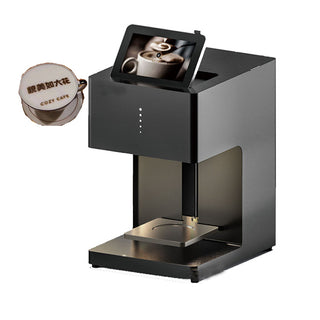
| Print area | 20 × 20 cm — cups through small cakes | 5–11 cm — cup foam and small pastries |
| Prints on | Coffee, cookies, cakes, brownies, macarons, chocolate, toast | Coffee, milk, yogurt, toast, cakes, biscuits |
| How you run it | Load-and-print from a PC (USB) or phone (QR) | Built-in touchscreen — standalone, no computer at the counter |
| Body | Compact benchtop | Stainless steel, wipes down fast |
| Warranty | 1 year + technical support | 2 years + technical support |
| Best for | Bakeries, dessert tables, caterers — anything bigger than a cup | Cafes focused on branded coffee that want a fast, self-contained station |
Pick the Coffee & Cookie Printer if the appeal is range — the 20×20 cm bed means the same machine brands a cookie, a macaron, and a birthday cake, not just the foam. Pick the Intelligent Selfie Coffee Printer if the job is cups at pace: the touchscreen runs it without a laptop, the stainless body wipes down between rushes, and the two-year warranty rides along. Neither is an upgrade of the other — they are sized for different services.
Want the full spec sheet, the demo video, and current price? Here are both coffee printers in our catalog: