

In short: a restaurant POS system is the hub, and kiosks, kitchen screens and menu boards are spokes around it. Choose the software first, buy hardware its platform supports, and add a kiosk only when the queue at the counter is your bottleneck.
Twelve people are in line at 12:20. The grill is keeping up, the assembly line has capacity to spare, and the queue still grows, because one person at one terminal is taking every order, every card payment and every "can I swap the sauce". A restaurant POS system is usually bought as a till. In a busy room it works as the traffic controller for the whole building, and the screens around it decide how many orders an hour that controller can handle.
How does a restaurant POS system move an order to the kitchen?
Every order passes through three points. It is captured (at a counter terminal, a handheld, a kiosk or a guest's phone), it is sent to the station that makes it (as a printed ticket or on a kitchen screen), and it is handed back to the guest with some signal that it is ready. The POS software sits in the middle and keeps all three in sync.
| Device | Where it sits | Job in the stack | Best fit |
|---|---|---|---|
| Counter POS terminal | Front counter, bar | Takes orders and payments, drives the cash drawer and receipt printer | Every venue; the one piece nobody skips |
| Handheld POS | In a server's hand, in the queue | Takes orders and card payments away from the counter | Table service, patios, queue-busting at peak |
| Kitchen display (KDS) | Above the line or the pass | Replaces paper tickets; shows order age and bumps finished items | Kitchens with several stations or high ticket counts |
| Self-order kiosk | Wall or floor near the entrance | Guests order and pay without staff | Counter service with a lunch or evening rush |
| Digital menu board | Above the counter, in the window | Shows the menu, changes by daypart, hides sold-out items | Any counter format with a menu that changes |
The counter terminal comes first because everything else hangs off it. A dual-screen unit gives the guest a second display facing them, so they can check the order and total before paying. That cuts the "was that a large?" exchange at the worst moment. The 15.6-inch model below runs Windows 10 or Android 11 with a 1920×1080 main screen, Wi-Fi 6 and NFC, and it takes a separate 80 mm receipt printer and cash drawer.
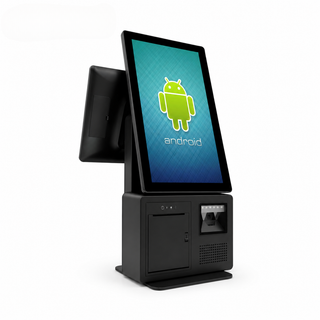
If counter space is tight, a terminal with the printer built into the base removes one box and one cable. The 14-inch unit here has an 80 mm thermal printer with an auto-cutter at 200 mm per second, an RJ11 port for the cash drawer, and processor options from an Intel Celeron up to a Core i7, which matters if your software is a heavy Windows install.
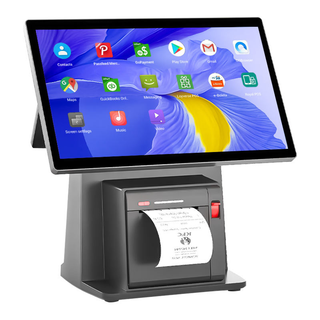
Handhelds take the same job away from the counter. On a terrace or down a long queue, a server takes the order and the card together, and the ticket reaches the kitchen before the guest sits down. This one runs Android 13 on a 6.75-inch screen, has NFC and 4G, and prints receipts from a built-in thermal printer.
At the kitchen end, a display replaces the ticket rail. Each order appears with a timer, cooks bump items as they finish, and the POS knows which orders are late without anyone shouting. The screen lives next to steam and grease, so front sealing matters more than resolution. The 21.5-inch unit below is IP65 at the front and IP54 at the back, runs Android 13, and can take power over the network cable (PoE), which saves running a socket to the wall above the line.
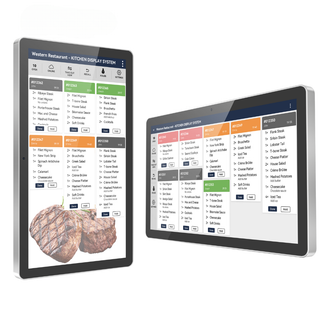
Paper tickets still work in a one-station kitchen, and a printer is cheaper than a screen. The case for a KDS grows with every extra station: once a single order is split between the grill and a cold line, paper gets lost and a screen keeps each part tied to the same order. The full range of counter and handheld terminals sits in our POS systems collection, with kitchen screens under payment terminals and KDS.
When does a self-order kiosk pay back?
A self-order kiosk pays back when the counter, not the kitchen, is what limits your orders per hour. If guests queue while cooks wait for tickets, a kiosk adds ordering capacity without adding a person at the till. If the kitchen is already the bottleneck, a kiosk only moves the queue from the counter to the pickup shelf.
A quick test before buying. Stand at the counter during the busiest thirty minutes of the week and count how long the average order takes to take and pay. Then check how long the kitchen takes to make it. When order-taking is the longer of the two, each kiosk works like a second till that never needs a break.
There is a second payoff that is harder to measure in advance. A kiosk offers the drink and the side on every order, which a busy cashier at 12:20 often skips. How much that lifts the check depends on your menu and how the prompts are written in the software, so treat it as a bonus rather than the business case.
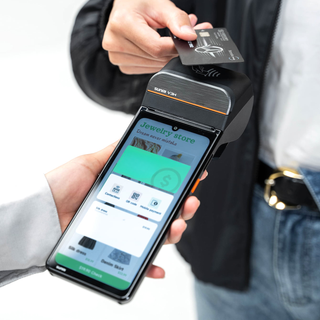
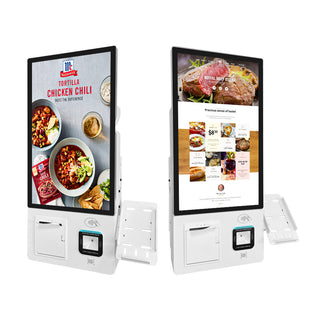
Kiosks come in two mounting styles. Wall-mounted units save floor space in a narrow entrance and are harder to knock over; the 21.5-inch model below has a 3-in-1 card reader (chip, magstripe and contactless), a metal PIN keypad, a thermal receipt printer and a 1D/2D scanner for loyalty codes, with an SDK for integration with your ordering software.
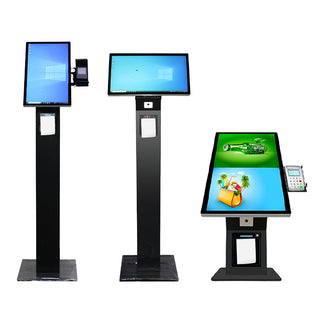
Floor-standing kiosks work in a wide lobby or food hall, where guests approach from several sides and a freestanding unit becomes its own small counter. This one has a 1920×1080 touchscreen and a ticket printer, with optional card readers and scanners fitted to order.
Two details decide whether a kiosk actually gets used. First, payment: a kiosk that sends guests to the counter to pay only splits the queue in two, so fit a card reader your payment provider accepts. Second, placement: put kiosks where people stand while they read the menu, not beside the pickup point, or ordering and collecting guests block each other. The rest of the range, including a 27 or 32-inch wall-mounted ordering screen with QR payment, is in the self-order kiosks collection.
What should a digital menu board do that a printed one cannot?
A digital menu board earns its place by changing. It switches from breakfast to lunch at 11:00 without a ladder, it removes an item the moment the kitchen runs out, and it can put the high-margin item in the spot where guests look first. If your menu never changes, a well-printed board is the cheaper choice.
For a screen above a counter, three specifications do most of the work. Brightness decides whether the menu is readable next to a sunny window; around 500 nits is a sensible indoor floor, and a screen facing the street needs far more. Panel lifespan matters because a menu board runs twelve or more hours a day. The content system decides how easily you update it, and a built-in CMS with remote management means a price change goes to every screen from one laptop.
The wall-mounted board below has 500 nits of brightness, a 60,000-hour panel and a built-in CMS for remote updates. It is also a touchscreen, so it can double as an ordering point.
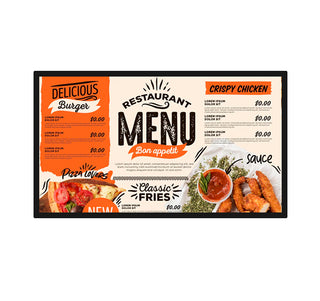
Ultra-wide stretched screens fill a different space: the narrow strip above a service counter, or a line across the top of the pickup area showing which order numbers are ready. That last use is quietly useful in a fast counter format, because it stops guests from crowding the handoff to ask.

For window displays and exterior signs, standard LCDs wash out in daylight. LED panels built for outdoor use, including IP65 fixed screens and transparent film for glass, sit in our LED screens and video walls collection, with more indoor formats under digital signage. Tabletop ordering screens and touch tables live in interactive menus.
Hardware you buy once, software you subscribe to
Every device above is hardware, bought once. The software that makes it a restaurant POS system is almost always a separate subscription, and so is card processing. Which platform you choose depends on your country, your payment provider, your delivery partners and whether you need table plans or multi-site reporting. That choice is specific to each venue, so we don't rank vendors here.
What we can say is how the choice affects the hardware.
| Layer | What you pay for | What to check before buying hardware |
|---|---|---|
| POS software | Usually a monthly subscription per site or per terminal | Supported operating system (Windows, Android or both); certified hardware list |
| Card payments | Processing fees per transaction; terminal rules set by the provider | Whether the provider allows third-party card readers or supplies its own |
| Kiosk ordering app | Often an add-on to the POS plan | Screen size and orientation it supports; SDK or integration route |
| Kitchen display app | Often an add-on, sometimes included | Android version; network or PoE connection at the line |
| Menu board content | Built-in CMS, or a separate signage service | Whether the screen's own CMS is enough or you want menu prices synced from the POS |
The practical order is software first, then hardware. Pick the platform, get its list of supported devices and operating systems, and buy terminals that match. Most of the terminals here are sold with Windows or Android and a choice of processor and memory, so one physical model can usually be configured to fit the platform you picked. Check the ports too: an RJ11 cash drawer port, RS-232 serial and a LAN socket cover most printers and scanners, plus the drawer.
A delivery-heavy site should also route app orders into the same POS and kitchen screen rather than a row of tablets; our guide to opening a ghost kitchen covers that setup.
Which restaurant POS system setup fits your service style?
Start from how guests order, not from the device list.
| Service style | Order capture | Kitchen | Screens for guests |
|---|---|---|---|
| Café or small counter | One counter terminal with built-in printer | Printed tickets | Printed board, or one digital board |
| Fast casual, lunch rush | Counter terminal plus one or two kiosks | KDS at each station | Menu boards plus an order-ready strip |
| Table service | Counter terminal plus handhelds | KDS or printers per station | Optional tabletop menus |
| Bar with food | Terminal at the bar, handheld for the floor | One kitchen screen or printer | Screens for specials and events |
Sizing the number of terminals follows the queue. Count the people taking orders at the busiest moment, give each a device, and keep one spare path so a frozen terminal does not stop service.
Four ways an ordering stack goes wrong
- Buying terminals before choosing software. A good terminal on an unsupported operating system is a paperweight. Get the platform's device list first.
- A kiosk without card payment. Guests order on the screen and then queue at the counter to pay, so the kiosk adds a step instead of removing one.
- A kitchen screen that cannot survive the kitchen. An office monitor above a fryer fogs up and fails. Look for a sealed front (IP65) and a mount that keeps it out of splash range.
- Wi-Fi for everything. Kiosks and kitchen screens that drop off the network during a rush lose orders. Run a cable to anything fixed and keep Wi-Fi for the handhelds.
For the wider restaurant build around this stack, our guide to how to open a restaurant covers the kitchen behind the pass.
Already chosen your POS software? Send us the platform and its supported devices, the number of stations and how your guests order, and we will match the hardware to it.


